
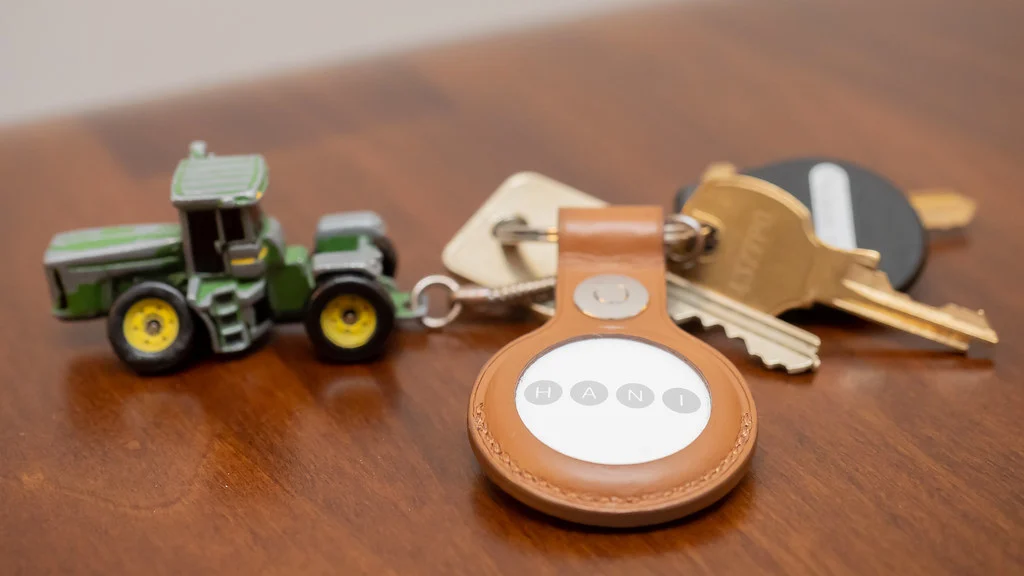
The best Bluetooth tracker is not necessarily the one with the longest advertised range or the loudest alarm. It is the tracker supported by your phone, surrounded by a useful crowdsourced finding network, shaped for the item you might lose, and designed with sensible unwanted-tracking protections. An AirTag can be an excellent choice for an iPhone owner and the wrong purchase for someone who uses only a Galaxy phone.
This guide compares the major tracker families by ecosystem and practical use. It draws on current manufacturer documentation rather than claiming a controlled range or speaker-volume test. Product support, network names, and phone requirements can change, so confirm compatibility before buying. Visit our Mobile category for more connected-device advice, or return to NexalooTech Home.
In this article
- Quick picks by phone and purpose
- How Bluetooth trackers actually find things
- Apple AirTag: the natural iPhone choice
- Galaxy SmartTag2: designed around SmartThings Find
- Chipolo ONE Point and Google-compatible tags
- Tile: useful when the household already uses it
- Choose the right shape for the item
- Precision Finding versus a loud speaker
- Battery, weather resistance, and maintenance
- Privacy and unwanted-tracking safeguards
- Using a tracker in checked luggage
- A practical pre-purchase checklist
- Verdict
- More Related Articles
Quick picks by phone and purpose
- Best fit for iPhone owners: Apple AirTag. It integrates directly with Find My, supports a replaceable CR2032 battery, can play a sound, and offers Precision Finding on compatible iPhones.
- Best fit for Samsung Galaxy owners: Galaxy SmartTag2. It works through SmartThings Find, includes a built-in attachment loop, and supports UWB-assisted finding with compatible Galaxy hardware.
- Best Google-network alternative: Chipolo ONE Point. It is designed for Google’s item-finding network and has a keyring hole, which removes the need for a separate holder.
- Best option for an established Tile household: Tile Pro. It remains useful when family members already rely on Tile and Life360 features, but buyers should verify current app and phone support.
There is no universal winner. Start with the phone that will manage the tracker, then narrow the choice by attachment method, finding tools, battery serviceability, and the environment where loss is most likely.
How Bluetooth trackers actually find things
A tracker has two distinct jobs. When it is nearby, your phone communicates with it directly over Bluetooth and may show a signal-strength gauge, play a sound, or provide distance and direction through ultra-wideband technology. Walls, furniture, interference, the phone model, and the orientation of the tag can all affect this local experience.
When the tag is far away, it does not behave like a cellular GPS tracker. Instead, another participating device must pass close enough to detect the tag and privately relay an approximate location through the vendor’s finding network. Results therefore depend on network participation and nearby compatible devices. A Bluetooth tag is ideal for recovering keys in a house or a bag left in a busy public place; it is not a guaranteed real-time vehicle or pet tracker.
Apple AirTag: the natural iPhone choice
AirTag is managed inside Apple’s Find My app. Owners can view the last reported location, trigger the built-in speaker, use Lost Mode, and share an item with trusted people. Apple’s current support documentation says Find Nearby requires an iPhone that supports Ultra Wideband, and environmental obstacles can affect the result. The replaceable CR2032 cell is easy to source, although Apple warns that some bitterant-coated batteries may not make reliable contact unless their packaging specifically states AirTag compatibility.
The circular tag has no integrated keyring hole, so keys and luggage usually require a holder. That extra accessory changes the total size, durability, and price. AirTag is the clearest option for an all-iPhone household, but an Android-only user cannot configure it as a normal personal tracker. If your next phone decision is still open, our Android versus iOS comparison explains the broader ecosystem tradeoffs.
Galaxy SmartTag2: designed around SmartThings Find
Samsung documents SmartTag2 as a Galaxy-focused product. Its specifications list Bluetooth 5.3, UWB, a replaceable CR2032 battery, IP67 resistance, a buzzer, and an integrated loop. Samsung rates unobstructed Bluetooth distance at up to 120 meters and battery life at up to 500 days under typical conditions, but both figures are best-case manufacturer estimates rather than guarantees.
UWB-based Compass View or precise nearby guidance requires a supported Galaxy phone. Other Galaxy models can use Bluetooth-oriented finding without gaining every precision feature. SmartThings routines add an interesting secondary use for the tag’s button, but that feature should not outweigh finding reliability. Check Samsung’s live compatibility list for the exact handset rather than assuming every Android phone will work.
Chipolo ONE Point and Google-compatible tags
Chipolo ONE Point targets Android users who want compatibility with Google’s finding experience. Its built-in keyring opening and replaceable battery make it straightforward for keys and bags. The important distinction is the product suffix: similarly shaped Chipolo products can belong to different networks or use the separate Chipolo app. A buyer should confirm that the exact model, region, Android version, and Google account are supported.
Google-network tags are attractive to Android users outside Samsung’s ecosystem, but precision features vary by tracker and phone. Do not infer UWB direction finding simply because a product appears in a large finding network. Read the model’s current specifications and treat Bluetooth signal guidance and a speaker as separate capabilities from UWB.
Tile: useful when the household already uses it
Tile offers several shapes, including models intended for keys, wallets, and luggage. Tile Pro is the larger keyring-style choice, while card-like models may fit a wallet more naturally. The value proposition increasingly includes integration with Life360, which can be convenient for a family already using that service.
Check whether the battery is replaceable on the exact Tile model. Some slim designs trade serviceability for size. Also compare the size of the relevant crowdsourced network in the places you visit, not just the Bluetooth range printed on a product page. A mature account setup and shared household workflow can make Tile practical, but it is not automatically the best choice for every iPhone or Android owner.
Choose the right shape for the item
Keys need a secure hole or holder that will not open under twisting loads. A wallet needs a thin card format that does not create a pressure point. Luggage benefits from a discreet location inside the bag, where the tag cannot be torn away, while a remote control may suit an adhesive-backed design. Measure the intended space before ordering and include any required holder in the dimensions.
For a bicycle, hide the tracker without enclosing it in enough metal to weaken its radio signal or muffle the speaker. Remember that a tag is a recovery aid, not an anti-theft system. Use a quality lock and report theft rather than confronting a person at a reported location. Location reports can be delayed or imprecise.
Precision Finding versus a loud speaker
UWB direction finding is valuable in a cluttered room because it can provide more specific guidance than a generic Bluetooth-strength indicator. It requires UWB hardware in both the phone and tracker plus compatible software. A loud, distinctive speaker may still be faster when the item is under laundry or inside a drawer.
Test both methods immediately after setup. Place the tag under a cushion, inside a closed suitcase, and one room away. Confirm that everyone who is supposed to share the item can see it and that alerts are enabled. People with hearing or vision needs should test haptics, screen-reader labels, directional instructions, and sound frequencies during the return window.
Battery, weather resistance, and maintenance
A replaceable coin cell can keep a tracker in service for years, but coin batteries are hazardous if swallowed. Store new and used cells away from children and pets, follow polarity instructions, and dispose of them through an appropriate battery collection service. Calendar estimates are less useful than low-battery alerts and an annual check before important travel.
Water-resistance ratings reduce anxiety around rain and spills, but they do not make a tracker indestructible. A worn seal, impact, salt water, detergent, or an improperly closed battery cover can change protection. Dry a wet tag according to the manufacturer’s instructions and inspect holders for cracks or loose fasteners.
Privacy and unwanted-tracking safeguards
Never place a tracker on another person or their property without informed permission. Modern platforms provide alerts and audible warnings intended to reveal an unfamiliar tag moving with someone, but no safeguard is perfect. Learn how unwanted-tracker alerts appear on your phone and keep operating-system updates current.
Secure the account behind the tracker with a unique password and multifactor authentication. Our password manager guide covers safer credential storage. When selling or giving away a tag, remove it from the original account and factory-reset it using the official procedure so the next owner can activate it.
Using a tracker in checked luggage
A Bluetooth tracker can help identify a suitcase’s last relayed location and confirm whether it reached an airport area. It cannot force an airline to retrieve the bag, replace a baggage claim, or guarantee a live position inside aircraft infrastructure. Keep the tag inside the luggage and keep irreplaceable medication, travel documents, batteries, and valuables in accordance with airline and security rules.
Before departure, verify that the tracker reports normally, the battery is healthy, and the owner’s contact information is current. Airline and aviation rules can vary by country and may change, so check the carrier’s current policy instead of relying on an old social-media post.
A practical pre-purchase checklist
- Confirm the exact phone, operating-system version, region, and account support.
- Choose the finding network that best matches the phones around you.
- Check whether UWB guidance works with your specific handset.
- Include the cost and dimensions of any keyring, adhesive mount, or holder.
- Prefer a replaceable battery if long service life matters.
- Review water resistance, speaker behavior, item sharing, and privacy alerts.
- Test recovery in realistic rooms and bags before the return period ends.
Verdict
AirTag is the most coherent starting point for most iPhone households, while Galaxy SmartTag2 makes the strongest case for compatible Samsung users who want an integrated loop and UWB-assisted guidance. Chipolo ONE Point is a more natural route into Google’s finding network, and Tile remains worth considering where its app and Life360 workflow are already established.
Buy for the ecosystem first and the printed range second. A properly attached, maintained tracker with a healthy battery and a familiar recovery workflow is far more useful than a theoretically stronger model that your phone cannot fully support. For handset options that can manage these accessories, continue with our best phones buying guide.